

What Does Collate Mean When Printing? A Complete Guide
If you have printed several copies of a multi-page document before, you have probably noticed a Collate checkbox in the print settings. It looks like a small setting, but the choice between collated and uncollated changes a lot when you are printing reports, manuals, booklets, presentations, catalogs, and instruction sheets.
So, what does collate mean when printing?
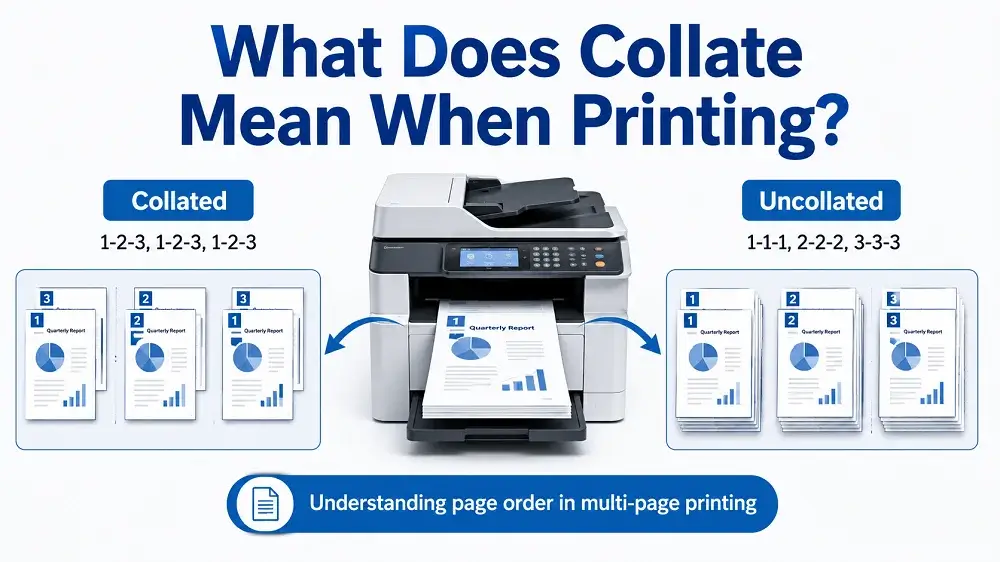
Collate means arranging the pages of each copy of a multi-page document in the correct sequential order. Print three copies of a five-page document with collating turned on, and your printer gives you three finished sets:
1, 2, 3, 4, 5 → 1, 2, 3, 4, 5 → 1, 2, 3, 4, 5
Switch collating off, and the printer groups identical pages together instead:
1, 1, 1 → 2, 2, 2 → 3, 3, 3 → 4, 4, 4 → 5, 5, 5
Microsoft describes the Collate setting in much the same way: as the option you use when multiple copies of a multi-page document need to be printed in sets.
At ZEE Packaging, we work with printed materials that travel alongside packaging every single day, such as instruction inserts, product information sheets, promotional leaflets, manuals, and multi-piece printed sets. Knowing how collation works helps ensure that these materials arrive in the correct sequence and makes them far easier to assemble, bind, pack, or hand out.
What Does Collated Printing Mean?
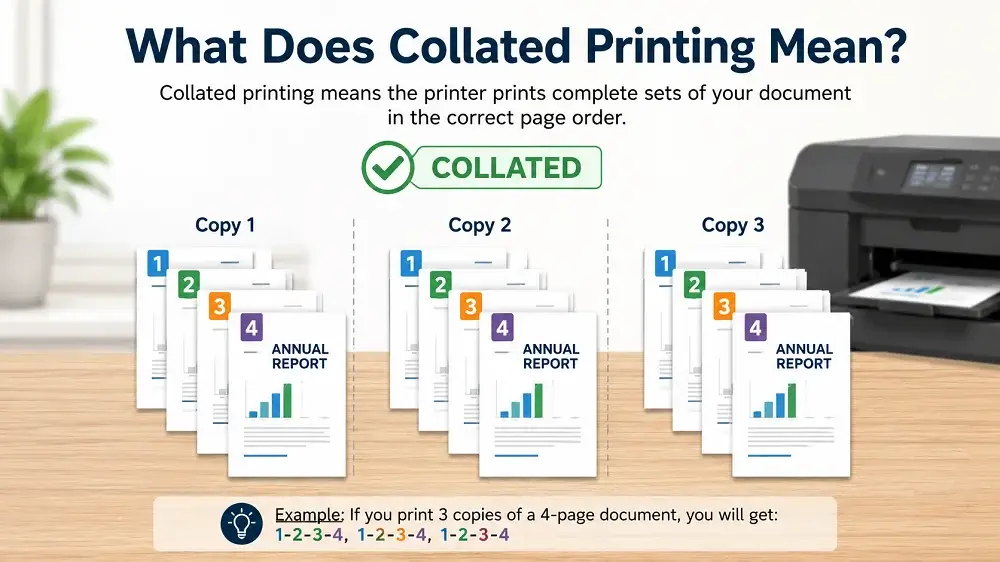
Collated printing means the printer finishes one complete copy of the document before it starts the next one.
Say you have a four-page product instruction guide:
- Product Overview
- Setup Instructions
- Safety Information
- Warranty Information
You need 100 copies. With Collate selected, the printer produces:
- Copy 1: Pages 1, 2, 3, 4
- Copy 2: Pages 1, 2, 3, 4
- Copy 3: Pages 1, 2, 3, 4
This continues until all 100 complete sets are produced. Each set is then ready to be stapled, folded, bound, inserted into packaging, or distributed, with nobody having to reorganize loose sheets by hand.
What Does Uncollated Mean When Printing?
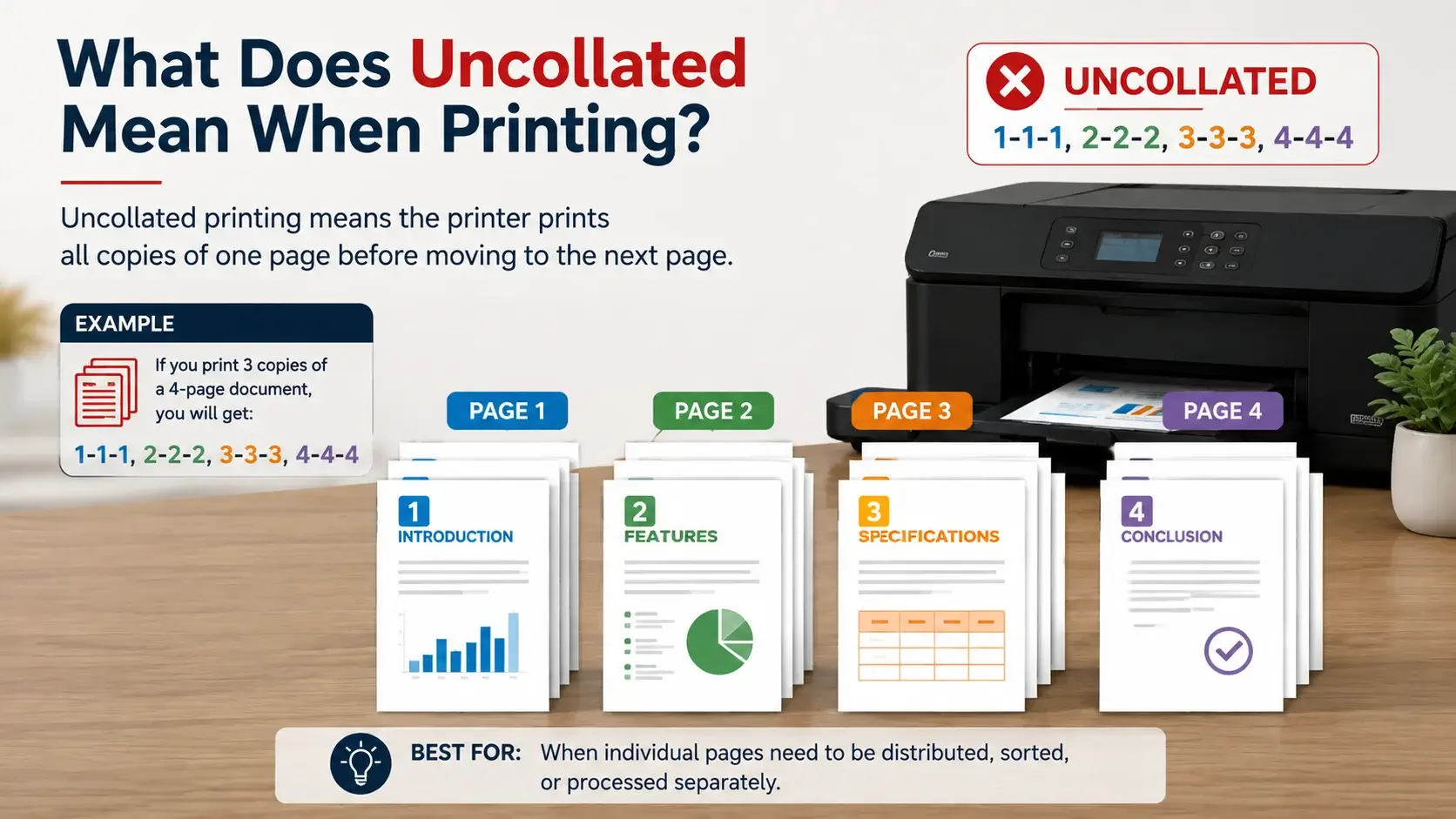
Uncollated printing means all copies of one page are printed before the printer moves on to the next page. For the same four-page document printed in three copies, the output looks like this:
1, 1, 1
2, 2, 2
3, 3, 3
4, 4, 4
Rather than three ready-to-use documents, you end up holding stacks of matching pages, and somebody has to arrange them back into complete sets. Uncollated output still has its uses, mostly where individual pages need to be distributed or processed on their own.
Collated vs Uncollated Printing
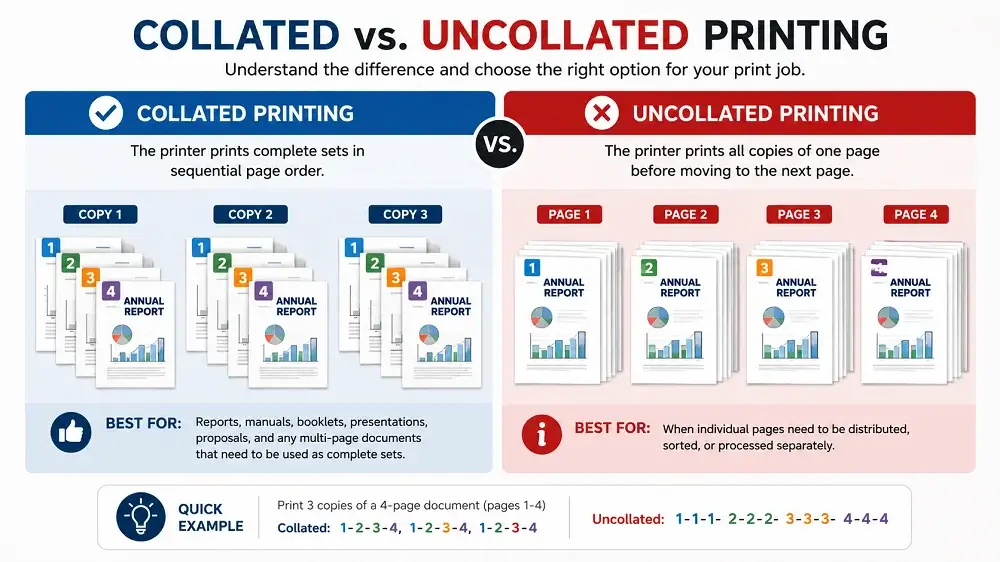
Feature | Collated Printing | Uncollated Printing |
|---|---|---|
Page sequence | Complete sets | Identical pages grouped together |
3 copies of pages 1 to 4 | 1234, 1234, 1234 | 111, 222, 333, 444 |
Best for | Reports, manuals, booklets, presentations | Flyers, individual sheets, sorting workflows |
Manual sorting | Usually unnecessary | Often required |
Binding and stapling | Ready to finish | Requires organization first |
When Should You Use Collated Printing?
Collated printing is the better call any time you need multiple complete copies of a multi-page document. Common jobs include instruction and training manuals, presentation decks, product catalogs and sales brochures, multi-page reports, course materials and workbooks, and warranty or installation documents.
Collation matters most where the printed pieces will later be folded, stapled, bound, packaged, or handed directly to a person.
When Should You Print Uncollated?
Uncollated printing works where identical pages need to stay together. Picture a training event where Page 1 goes to registration, Page 2 goes to the training room, and Page 3 goes to management. Separate stacks are simply easier there.
Uncollated also suits you when:
- Individual sheets get distributed separately or go to different departments
- Each page requires a different finishing process
- Sheets need to be inspected or processed individually
- You are producing forms rather than complete documents
Why Is Collating Important in Printing?
It looks like a small organizational feature, but the production advantage is real.
Reduces manual sorting. Print 1,000 copies of a 20-page manual uncollated, and you finish with 20 separate stacks of 1,000 sheets each, all of which must become 1,000 individual manuals. Collation handles that inside the printing or finishing workflow instead.
Helps prevent page order errors. Hand sorting opens the door to missing pages, duplicate pages, pages inserted backward, and sections landing in the wrong document. Proper collation cuts those problems down.
Makes binding easier. Documents already in sequence move smoothly into stapling, folding, saddle stitching, perfect binding, spiral binding, Wire-O binding, and punching.
How Does a Printer Collate Pages?
It depends on the equipment. On most office and digital printers, the device or the print software controls the page sequence by itself. Ask for 25 copies × 8 pages, and the printer is told to output Pages 1 to 8 repeated 25 times, rather than 25 copies of Page 1 followed by 25 copies of Page 2. Modern systems use software processing, printer memory, finishing equipment, or some mix of all three to organize the job.
Collate, Sort or Group: What the Setting Is Called
Wording changes depending on the printer, operating system, driver, or application. The same control can appear as Collate, Collated, Uncollated, Sort, Group, or Page Order. Microsoft PowerPoint, for example, lets users choose Collated or Uncollated when deciding how the printed sets come out.
Where a device offers Sort and Group instead, they usually behave like this:
- Sort: 1-2-3 / 1-2-3 / 1-2-3 (the same as collated)
- Group: 1-1-1 / 2-2-2 / 3-3-3 (the same as uncollated)
Always check the print preview or the equipment instructions when the wording is unfamiliar to you.
How to Select Collated Printing
The interface varies, but the steps are more or less the same everywhere:
- Open your document
- Select File
- Select Print
- Choose your printer
- Enter how many copies you need
- Find the Collate option
- Select Collated
- Check your remaining print settings
- Select Print
Many programs show a small icon next to it. Collated looks like 123 | 123 | 123, and uncollated looks like 111 | 222 | 333.
Collation in Commercial Printing
In commercial work, the idea gets more involved than ticking a box. Large runs bring in imposition, signatures, gathering, folding, cutting, binding, stitching, inserting, and quality control.
For books and larger publications, several pages print together on one large sheet, then fold into sections called signatures, and those sections must be gathered in the correct order before binding. Adobe notes the same thing about booklet printing: pages have to be arranged so that after double-sided printing, collating, folding, and stapling, they read in the proper order. In professional printing, collation is part of a wider print-finishing and assembly process.
Collation in Packaging and Product Printing
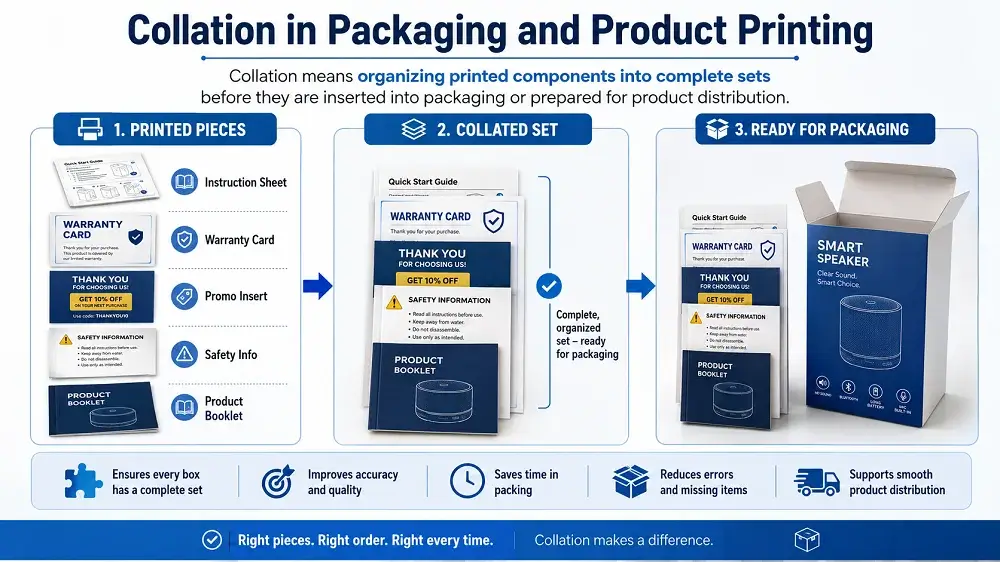
Collation is talked about more with documents, books, and commercial printing than with a single folding carton or shipping box. It still touches packaging projects, though.
At ZEE Packaging, printed packaging jobs often include extra materials such as:
- Product instruction leaflets
- Safety information
- Warranty sheets
- Promotional inserts
- Product catalogs
- Recipe cards
- Information booklets
- Coupon sheets
- Assembly instructions
- Multi-piece promotional kits
Say every package needs one instruction sheet, one warranty card, and one promotional insert. Those pieces have to be organized into consistent sets before they go inside the final package.
The process might be called kitting, gathering, inserting, or assembly, depending on whom you ask, but the goal is the same: every finished unit should contain the correct printed components in the right order.
Collation, Gathering and Imposition: What Is the Difference?
Term | Meaning |
|---|---|
Collation | Organizing pages or printed pieces into the required sequence |
Gathering | Bringing printed sections or signatures together in order |
Imposition | Arranging pages on a larger sheet so they read correctly after folding and cutting |
Inserting | Placing printed materials inside another item, envelope, folder or package |
Kitting | Combining several different components into one complete set |
Knowing these apart really helps when requesting commercial printing, since saying "collate these" may not describe a complex finishing requirement at all.
Common Collated Printing Mistakes
Selecting uncollated by accident. Hundreds of multi-page documents printed uncollated create a mountain of sorting work. Inspect settings before any large run.
Confusing collation with duplex printing. Selecting Collate does not make the document double-sided. Configure collation and duplex separately if you need both.
Printing a large run with no test copy. Before printing hundreds or thousands of copies, print one finished set and check page order, orientation, print quality, and finishing. That one check saves expensive reprints more often than people realize.
Is Collated Printing More Expensive?
For ordinary office printing, no. Selecting Collate does not use more sheets, since the same pages still print. On commercial work, the total cost depends on quantity, page count, paper stock, printing method, and the finishing stages involved. A job needing several printed components gathered, inspected, inserted, and packed naturally carries more production labor than a simple stack of matching sheets.
Final Thoughts
Collate in printing means arranging multiple copies of a multi-page document into complete, correctly ordered sets. Keep the simple distinction in mind:
- Collated: 1-2-3, 1-2-3, 1-2-3
- Uncollated: 1-1-1, 2-2-2, 3-3-3
Go collated when you want ready-to-use copies of reports, manuals, presentations, booklets, catalogs, or instructions. Go uncollated when you want groups of matching pages or plan to sort and process each page separately.
On commercial packaging projects, keep collating, gathering, inserting, kitting, and binding clearly separated in your instructions. Clear production notes are what get every printed component into the final package in the correct order and configuration, and our team at ZEE Packaging is always happy to walk through this with you before your job goes to press.
People Asked Questions
What does collate mean when printing? Collate means arranging the pages of multiple copies into complete sequential sets. Three copies of a four-page document print as 1234, 1234, 1234.
What does uncollated mean when printing? Uncollated printing groups matching pages together, so the same job prints as 111, 222, 333, 444.
Does collate mean staple? No. Collating arranges pages in order, while stapling fastens them together. A machine may do both, but they are separate processes.
Is collated printing double-sided? Not necessarily. Collation controls page order, while duplex printing controls whether both sides of each sheet are printed.
Why would anyone print uncollated? Uncollated printing is useful when identical pages need to be distributed, inspected, finished, or processed together before complete documents are assembled.
Can packaging inserts be collated? Yes. Instructions, warranty information, promotional inserts, and safety sheets can be organized into complete sets before they are placed inside packages.
What happens if I forget to select Collate? You will receive stacks of matching pages instead of complete document sets, so someone will have to sort them manually.